Tooling Stock Control
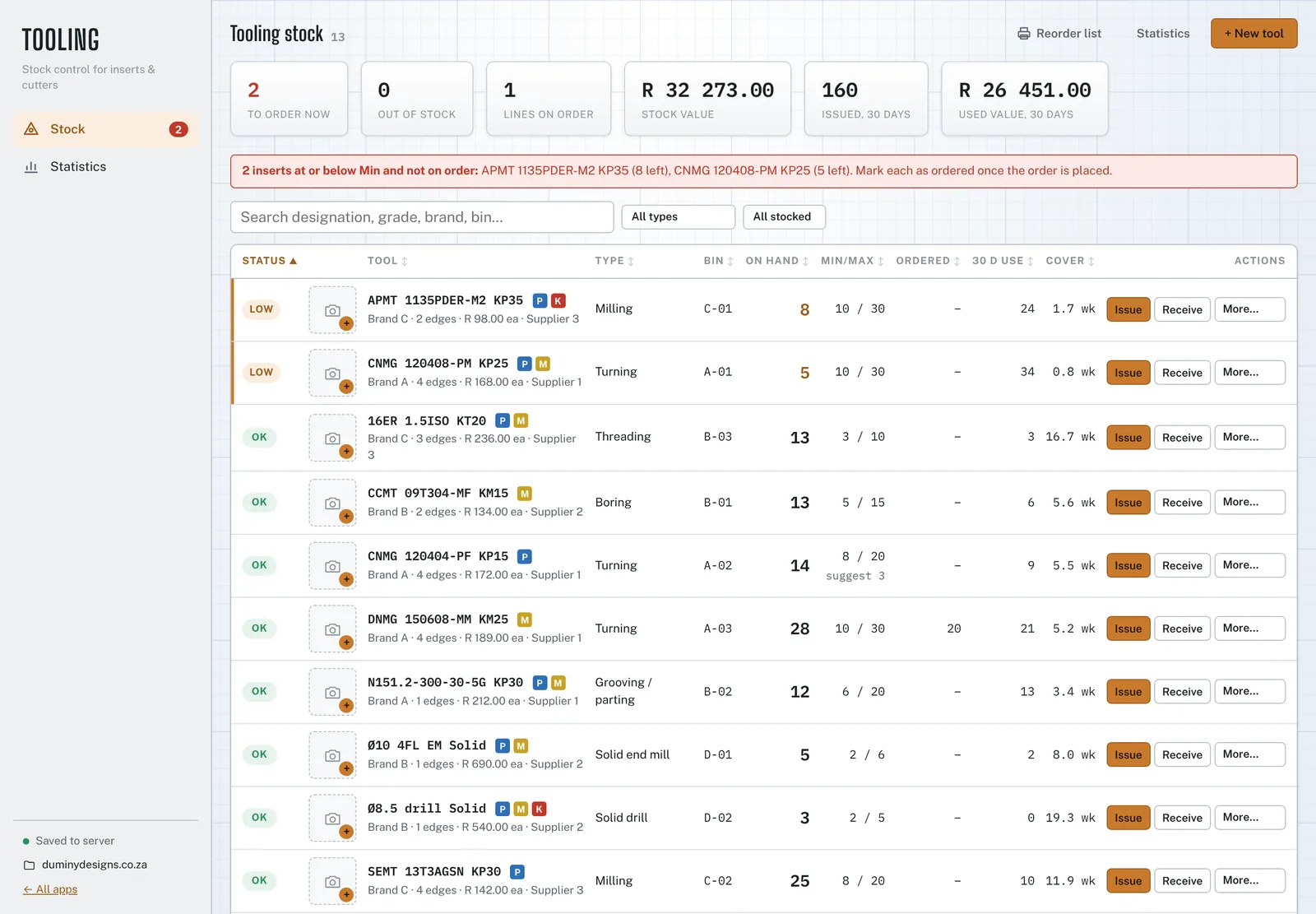
Stock control for carbide inserts and cutters. Every issue, delivery and count is a line in the ledger, so the number on the screen always matches the history behind it. Lines at or below Min are flagged before the bin runs empty, and the reorder list is grouped by supplier.
What it does
Runs in the browser behind a client login. Each user gets their own account, and you decide who can open it.
- Stock lines
- One line per insert or cutter: designation, chipbreaker, grade, brand, type, ISO material groups, cutting edges, bin, pack size, price, supplier and lead time. Typing a tool that already exists, with spaces, dashes or the chipbreaker in a different field, is caught before it is saved twice.
- Movements
- Issue to a person, machine and job with a reason, receive against a delivery note, return unused inserts, write off, count the bin, mark as ordered. On hand is the sum of the ledger, never typed in.
- Warnings
- LOW at or below Min, OUT at zero, with a count on the menu. Stock already on order stops the same line asking to be ordered twice.
- Ordering
- Order quantity refills to Max, rounded up to full packs. The reorder list prints as a PDF grouped by supplier, with a value per supplier.
- Min and Max
- A suggested Min from the last 90 days of use and the supplier's lead time, shown next to the Min you set when the two are far apart.
- Statistics
- Consumption by machine, person, job, client, tool type and issue reason; breakage share, stock-outs, dead stock, stock turns and an ABC split. Exports the movements as CSV and prints a management report.
- Pictures
- A photo or catalogue image per line, pasted straight from the clipboard.
- With Spindle
- Shares its stock and history with the Tooling page in Spindle Project Management, so an insert issued in either app shows in both.
Reorder point calculator
Free, no login. The same Min and order quantity rules the app uses, for one stock line.
This line
Issued minus unused returns.
Leave empty to use the suggested Min.
Result
The full version keeps every line and movement, warns when stock drops below Min and prints the reorder list. Request access
Lead times and use vary. Check the suggestion against what you know about the job mix before changing a Min.
How it's worked out
- on hand = Σ movements
- Opening stock, receipts and returns add; issues and write-offs subtract; a count logs the difference. Orders don't change on hand.
- use per day = used in 90 days ÷ 90
- Unused inserts returned to stock come off the issued total.
- suggested Min = ⌈use per day × lead time × 1.5⌉
- Covers the lead time with half as much again in hand, and is never below 1. A 7-day lead time is assumed when none is set.
- LOW: on hand ≤ Min · OUT: on hand ≤ 0
- A low line needs an order when on hand plus on order is still at or below Min.
- order = ⌈(Max − on hand − on order) ÷ pack⌉ × pack
- Refills to Max, or to twice Min when no Max is set, rounded up to whole packs.
- cover = on hand ÷ use per week
- Weeks the bin lasts at the 90-day rate.