Setup Sheet Generator
Open the program and the setup sheet is mostly written: tool list, offsets, work offsets, speeds, feeds, travel limits and program stops come from the G‑code. You add the workholding, stick-outs, holders and checks, and download an A4 PDF for the machine.
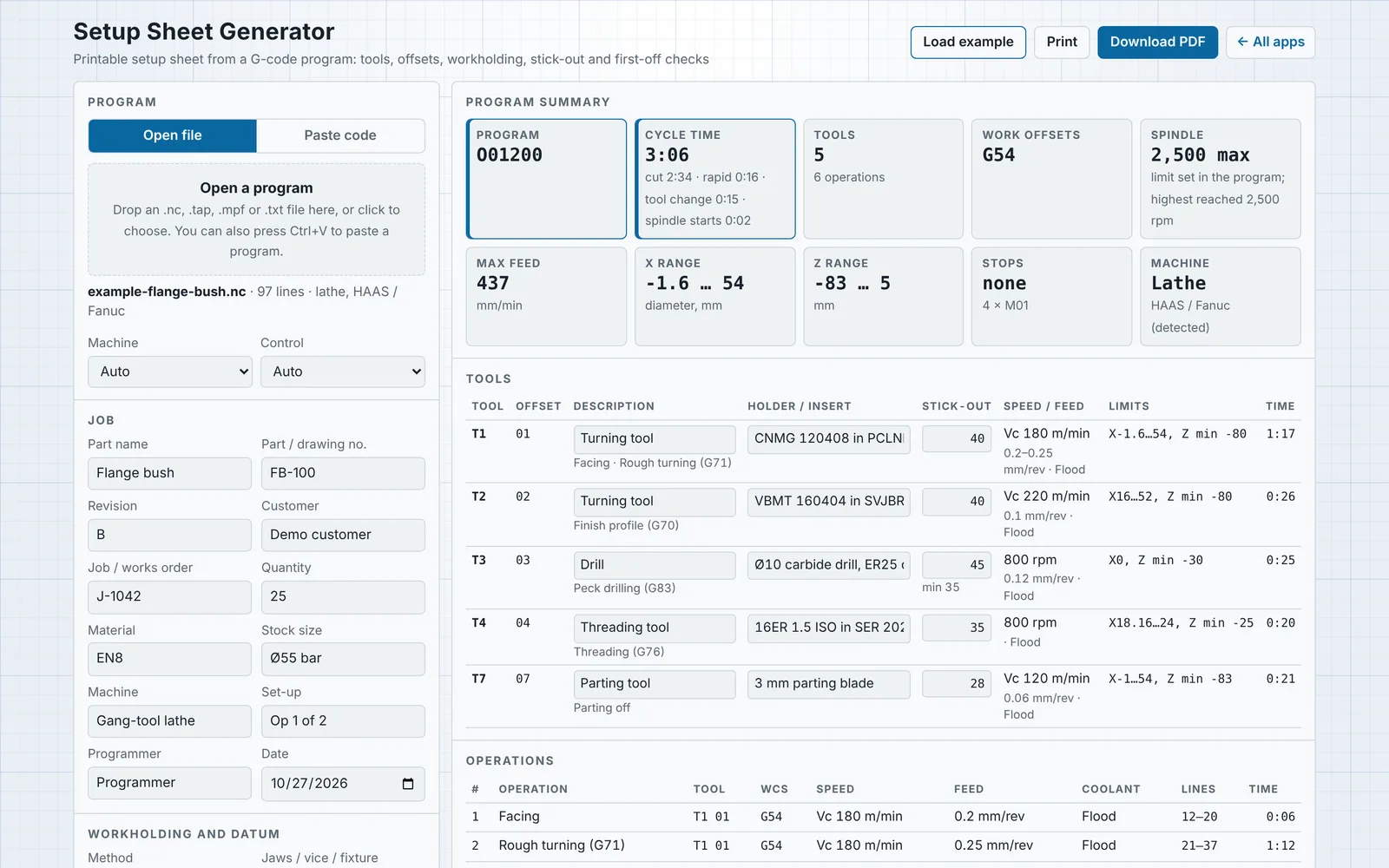
What goes on the sheet
Runs in the browser behind a client login. Each user gets their own account, and you decide who can open it.
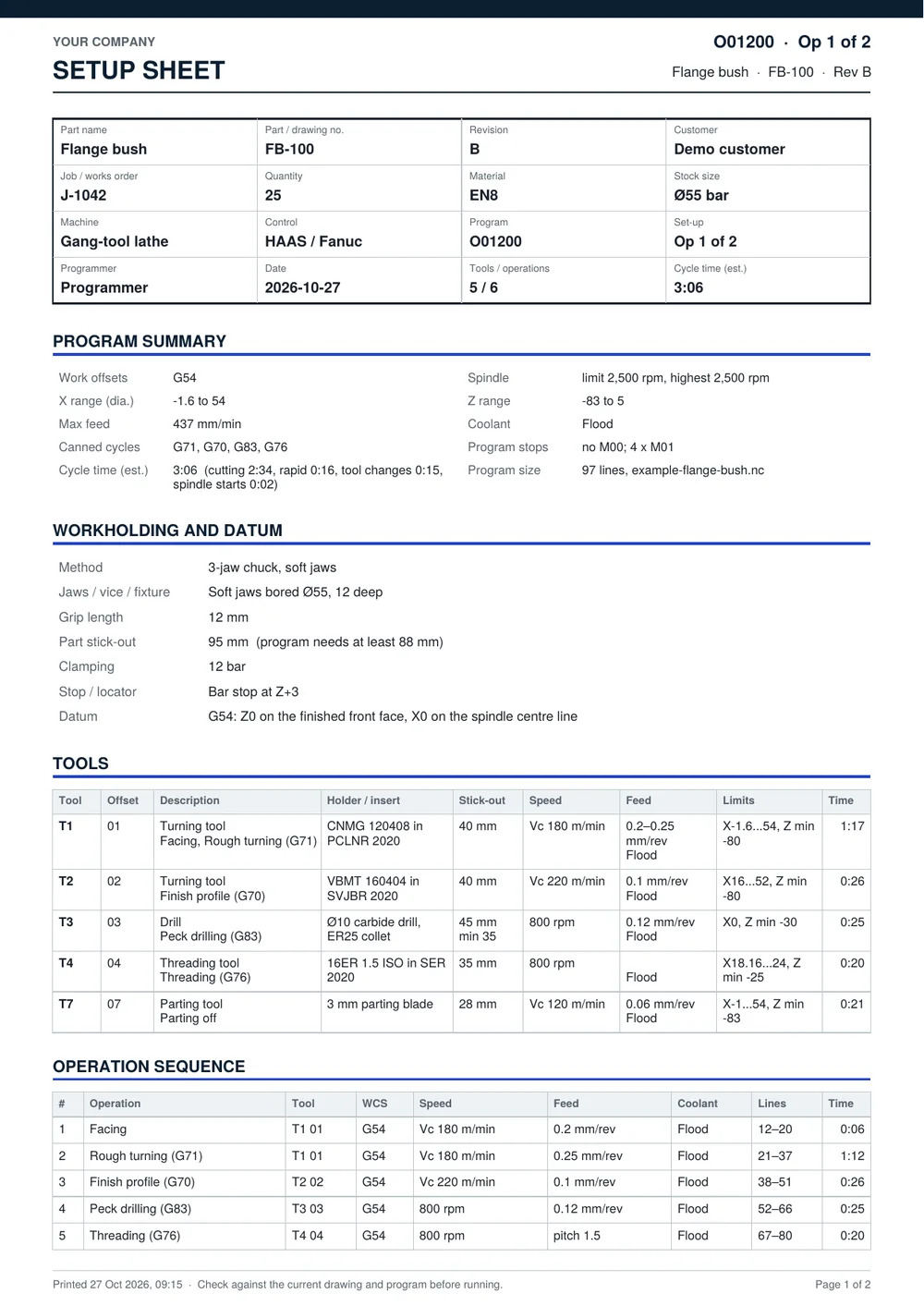
- Title block
- Part, drawing number and revision, customer, job, quantity, material, stock size, machine, control, program, set-up number, programmer and date.
- Summary
- Work offsets, spindle limit and highest speed, X, Y and Z travel, maximum feed, coolant, canned cycles, M00 and M01 stops, and an estimated cycle time split into cutting, rapids and tool changes.
- Workholding
- Method, jaws or vice, grip length, part stick-out, clamping pressure, stop and datum, with up to two set-up photos.
- Tools
- Tool and offset numbers, description and type, holder and insert, set stick-out next to the minimum the program needs, speed, feed, coolant, limits and time per tool.
- Operations
- Each operation in order with its tool, work offset, speed, feed, coolant, program lines and time.
- First-off checks
- Suggested from the program and editable: finished diameters, shoulder lengths, overall length, hole depths, threads and finish, with blank columns for one to five parts.
- Sign-off
- Setter notes and boxes for set-up, first-off check and release. The program listing can be added at the back.
What it reads
Details typed for a program are kept in the browser and come back when the same program number is opened again.
- Controls
- HAAS and Fanuc-style code, and Siemens Sinumerik programs, including named tools such as T="ROUGH_80".
- Machines
- Lathes (T0101 tool calls, diameter X, G96 with G50 or LIMS) and mills (T M6 with G43 H). Detected from the code, or set by hand.
- Code only
- Program comments are ignored. Tools, offsets, operations and values come from the code itself, so a stale CAM tool table or a wrong comment can't end up on the sheet. Works on CAM post output, programs from the Lathe Program Builder and code written by hand.
- Operations
- Split at tool changes, speed changes, spindle restarts, work offset changes, new cycles and M00 stops, and named from what the moves do: facing, OD turning or ID boring (roughing or finishing), grooving, parting off, drilling on centre, threading, face milling, milling to depth, and each canned cycle.
- Cycle time
- Every cutting move gets an acceleration and corner-speed profile with look-ahead, so long runs of short CAM blocks are timed the way the machine slows down through them. Rapids, tool changes, spindle starts and returns to machine home are added from settings, and one measured run calibrates the estimate to your machine. Subprograms (M97, M98) are followed. G71/G72 roughing is timed from the profile area, G76 threading from its passes and drilling cycles per hole; Sinumerik cycles and G75 grooving are listed but not timed.
- Stick-out
- Part stick-out from the deepest Z in the program, and tool stick-out from the deepest Z each drill or milling tool reaches, both plus a clearance you set.